

Content:
-
-
-
-
- Microsoft Copilot is changing from answering questions to doing the work
- Copilot: the overall experience
- What is Copilot Home?
- What is Copilot Chat?
- What is Copilot Cowork?
- What is Copilot Code?
- What is Copilot Autopilot?
- The easiest way to remeber the difference
- Why does this matter to businesses?
- How Microsoft charges for the different Copilot capabilities
- Do businesses have to start using everything?
- Copilot is moving from answering to doing
- Further Reading
-
-
-
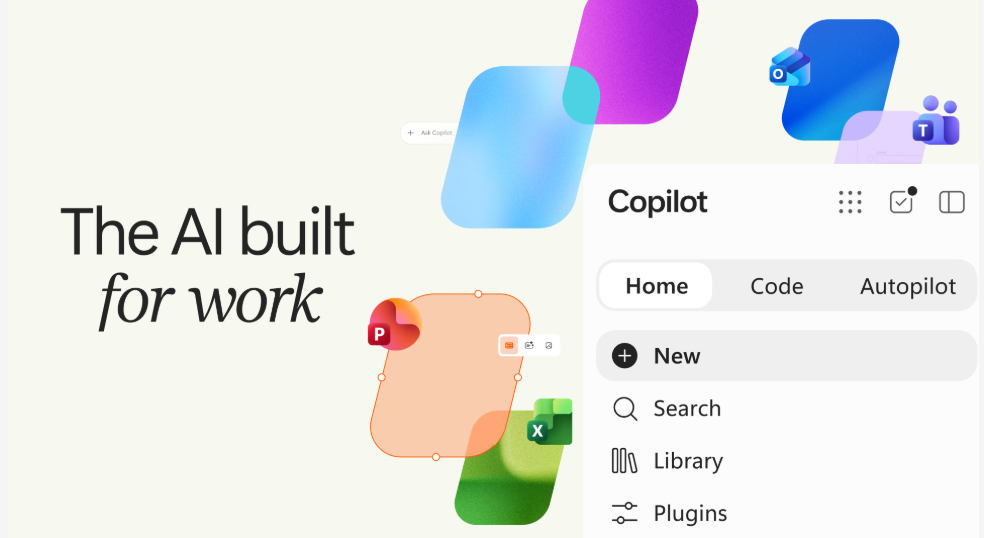
Microsoft Copilot is changing: from answering questions to doing the work
Until now, most people have used it for individual tasks, such as writing an email, summarising a meeting, analysing information or creating a document. However, the new Copilot goes much further. You can still ask it for help, but you can also delegate work, build solutions and give an AI agent ongoing tasks to complete.
Microsoft are introducing terms such as Home, Chat, Cowork and Code. Although the names may sound technical, the differences are straightforward.
In this blog, we explain what each term means and how the different parts fit together. We also look at the potential cost and control implications for businesses.
Copilot: the overall experience
First, it helps to understand that Copilot is the overall AI experience. Home, Chat, Cowork, Code and Autopilot are not separate versions that you need to choose between. Instead, they offer different ways to work within Copilot. The right option depends on what you want to achieve.
A useful starting point is:
- Home = where you start
- Chat = where you ask
- Cowork = where you delegate
- Code = where you build
- Autopilot = where you give ongoing work to an AI agent
Let’s look at each one in turn.
What is Copilot Home?
Home is the new starting point for Copilot.
According to Microsoft, Home brings Chat and Cowork together in one place. From there, you can review recent activity, see suggestions for useful tasks and continue work where you left off.
Think of Home as the front door to Copilot. From this starting point, Copilot can support you in different ways. You might ask a question through Chat, complete a larger piece of work through Cowork or build something with Code.
What is Copilot Chat?
Chat is the part of Copilot most people will already recognise. In Chat, you ask a question or give Copilot an instruction. It then responds.
You might ask it to:
- summarise some information
- help you understand a document
- create a first draft
- look something up
- help analyse information.
Microsoft describes Chat as conversational and suited to quick questions, lookups, draft creation and keeping you informed.
In simple terms: You ask. Copilot responds.
What is Copilot Cowork?
Cowork is for work you want to delegate rather than work through one prompt at a time.
Instead of you asking Copilot to complete each step separately, you describe the result you want. Cowork can then work through the task and produce a completed outcome. For example, Microsoft suggests using it to prepare a request for proposal response, launch kit, customer briefing or financial close package.
Using Chat you might typically ask:
“Summarise this information for my customer meeting.”
By contrast, Cowork can take on a larger piece of work without you guiding every individual step. That’s an important difference.
“Chat helps you do the work. Cowork lets you delegate more of the work.”
What is Copilot Code?
This is perhaps one of the most interesting developments for businesses. Code lets people describe what they want to build using everyday language and have Copilot create the solution.
For example, Microsoft says Code could create an app, tracker, dashboard, automation or workflow. Copilot can choose a suitable approach and build the solution.
Imagine your business has a spreadsheet that has gradually become complicated and difficult to manage. Rather than thinking: “We need someone to develop an application.”
You may increasingly be able to start with: “This is what we’re trying to achieve. Build us something that does it.”
Microsoft says Code uses the same underlying technology as GitHub Copilot and runs in a protected, isolated environment. Most importantly, this means that you store your applications within your own organisation’s Microsoft 365 environment.
This doesn’t mean everyone needs to become a software developer. Quite the opposite.
The important change is that the person who understands the business problem can describe the solution they need in plain English. Copilot will then help build it.
What is Copilot Autopilot?
Autopilot takes delegation another step further. Microsoft describes it as a persistent, proactive and personal agent. Unlike a standard Chat conversation, Autopilot can continue working without waiting for your next prompt.
You give Autopilot a role, an objective and set the boundaries within which it can work. For instance, Microsoft gives the example of a supplier review process. Autopilot could create the schedule and plan. It could then manage preparation, meetings, follow-ups and requests for updates.
Autopilot runs in the cloud, so it can keep working while your attention is elsewhere. You do not need to sit at your computer and prompt it continually.
This represents a significant change in how we think about AI at work.
The easiest way to remember the difference
If all the terminology is starting to become confusing, here’s the simplest way to understand it:
-
- Copilot is the overall AI experience.
- Home is your starting point, bringing the different ways of working with Copilot together.
- Chat is conversational. You ask a question or give an instruction and Copilot responds.
- Cowork is for work you want to delegate. You give it a task, and it works through that task towards a completed result.
- Code lets you describe an app, tracker, dashboard, automation or workflow in everyday language and have Copilot build it.
- Autopilot is an AI agent. You can give it an ongoing objective, and it can continue working towards it within the boundaries you set.
Or, even more simply:
-
- Chat: “Help me with this.”
- Cowork: “Do this piece of work for me.”
- Code: “Build something to solve this problem.”
- Autopilot: “This is the outcome I want. Keep working towards it.”
Why does this matter to businesses?
This is where the new Copilot becomes particularly relevant to businesses. Until now, much of the conversation about AI has focused on making existing tasks quicker. Could it draft an email, summarise a meeting or help create a presentation?
Although those uses remain valuable, the new capabilities encourage businesses to ask bigger questions. For example:
-
- Which repetitive pieces of work could we delegate?
- Could we replace a complicated manual process with a simple application or automation?
- Is an AI agent suitable for taking responsibility for parts of an ongoing process, within clearly defined boundaries?
As a result, businesses may be able to unlock much greater value. This leads us to another important part of Microsoft’s announcement: how Microsoft intends to charge for these capabilities.
How Microsoft charges for the different Copilot capabilities
The new capabilities also introduce an important distinction in how businesses pay for Copilot. Microsoft includes everyday AI activities such as quick answers, first drafts, summaries and analysis within its user subscription licensing model.
However, longer-running capabilities including Cowork, Code and Autopilot use Microsoft’s usage-based billing model. In plain English, there are now two concepts you need to understand:
-
- Subscription-based Copilot – You pay for the relevant user licence and use the capabilities that the licence includes.
-
- Usage-based AI – Microsoft charges for the use of some advanced capabilities.
This matters because introducing these capabilities isn’t simply a technology decision. You need to consider the cost and impact on governance.
Microsoft is introducing tools to help organisations manage usage. These tools include spending policies and usage controls. Users can also see their credit usage, remaining balance and usage history.
Do businesses have to start using everything?
No. You do not need to adopt every new capability as soon as Microsoft releases it.
At CSUK, we believe the right starting point is the business requirement, not the technology. You should first ask:
-
- What problem are we trying to solve?
- Is there a repetitive process taking up people’s time?
- Could we turn something we manage manually into a simple application?
- What would success look like?
- How much will it cost to run?
For organisations already using Microsoft 365 Copilot, a sensible first step is to choose one or two suitable areas. Focus on tasks where the newer capabilities could make a measurable difference. Then test them with a controlled group.
Next, review the results and monitor usage and cost. Based on that evidence, you can decide whether the results support wider adoption.
If your business is introducing Copilot for the first time, discuss the controls and permissions at the outset. You should also agree who can access usage-based services with your Microsoft partner, such as CSUK. Do not wait until people have already started using them.
Copilot is moving from answering to doing
The biggest change is not any single feature, whether Home, Chat, Cowork, Code or Autopilot. It’s what they represent. We are moving beyond AI that mainly answers questions and helps us complete tasks. Increasingly, we can give AI work to do. As a result, businesses have some genuinely exciting possibilities to explore.
However, a word of caution. As we give AI more responsibility, strong controls become more important. Businesses need to consider what AI can access, what actions they allow it to take, how much it costs and where people remain in control.
For us at CSUK and our clients, this is particularly important. We welcome conversations ahead of any AI deployment. We do not recommend that organisations introduce AI simply because a new feature is available. Instead, we believe that AI should solve a genuine business problem, work within sensible controls and deliver clear, measurable value.
We’ll continue to follow Microsoft’s rollout closely. Our team will help you understand which capabilities will benefit you, what they cost and how to introduce them safely. To learn more do get in touch.
GET IN TOUCH!
We want to hear about your challenges. Talk to us! Our consultants can audit your systems, plan changes, implement improvements and support your people.



Follow us on :
Services
IT Consultancy
Communications Services
Service Levels
Resources
Terms & Conditions
Privacy Policy
Mobile Roaming
Quick Links
Success Stories
Contact US
About US
Blog
GET YOUR FREE IT AUDIT!
To give you confidence in our service, get to know us and how we work, contact us for your Free IT Audit.
The IT Audit
- Provides us with the information to assess the status of your systems.
- Identifies any vulnerabilities and potential concerns.
- Shows you how we manage your systems and report back.
GET IN TOUCH!
Tell us about your IT challenges and what you need - we'd love to help.
Our consultants can review your systems and plan what's next; while our support team keep the business running smoothly and look after your people.
Call us on 0118 920 9420
Email us info@com-solutions.co.uk